Static HTML sites age badly inside growing businesses. How? Marketing teams bottleneck around developer availability, landing page requests pile up, and even basic content revisions require deployment cycles, staging checks, and unnecessary QA overhead.
If you think your clients won’t notice this, you couldn’t be more wrong!
At this point, your agency will likely get pulled into an HTML to WordPress project.
Of course, some projects demand fully custom HTML to WordPress theme development because the frontend architecture already carries complex UI logic or performance dependencies.
Others move toward Elementor and modular builders because production velocity matters more than handcrafted backend engineering.
At the end of the day, both workflows rely heavily on AI-assisted execution. This may include layout replication, template structuring, component generation, and shortcode cleanup. Even the process of partially converting HTML to WordPress moves substantially faster than it did a few years ago.
Let’s learn more in this regard.
The 2 Main Ways Agencies Convert HTML Sites to WordPress
Most HTML to WordPress migration projects fail before development even starts. Some common causes include incorrect workflow selection, unrealistic delivery assumptions, clients expecting enterprise flexibility from low-budget builder stacks, and agencies underestimating long-term maintenance costs. The technical route matters, but the business model behind that route matters even more.
Some agencies optimize for frontend precision and infrastructure control. Others optimize for speed, revision cycles, and client usability. Neither approach is automatically superior.
A proper convert HTML to WordPress strategy usually depends on four variables:
- Content management complexity across future publishing cycles
- Performance requirements tied to SEO or paid acquisition campaigns
- Internal technical capability within the agency delivery team
- Expected revision frequency after production deployment finishes
- Agencies that ignore these variables usually end up rebuilding projects twice.
1) Custom HTML-to-WordPress Development
This remains the preferred route for agencies handling serious frontend systems, large-scale content structures, or heavily customized functionality. Developers break static templates into modular wordpress architecture. This comprises header partials, dynamic loops, custom post types, flexible fields, theme hierarchy mapping, proper enqueue management, and more.
A custom HTML to WordPress theme gives agencies tighter control across nearly every operational layer:
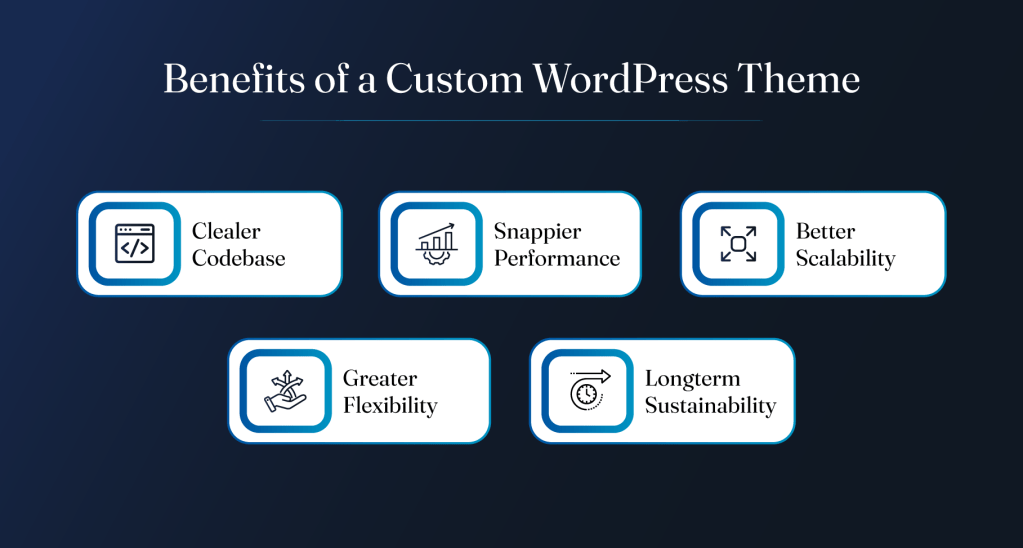
- Cleaner codebase management with fewer plugin dependencies
- Better Core Web Vitals performance under traffic-heavy conditions
- Easier scalability for multilingual or multi-author publishing systems
- Greater flexibility for API integrations and advanced functionality
- Lower long-term technical debt across enterprise-style projects
However, this control comes with obvious trade-offs. Stronger PHP expertise becomes mandatory, template debugging takes longer, and QA cycles become more rigorous because every component depends on custom implementation decisions.
Ultimately, converting HTML to WordPress works when agencies prioritize scalability and infrastructure stability over operational speed.
2) Elementor or Page Builder-Based Conversion
This workflow dominates modern agency production for one reason: operational efficiency. Especially where high-volume client environments are concerned, where turnaround time directly affects profitability.
Instead of fully rebuilding templates through custom theme engineering, agencies recreate layouts within Elementor, Bricks, or similar visual builders. Existing HTML structures become visual sections, reusable blocks, dynamic templates, and component libraries. AI tools can now accelerate this process aggressively through layout replication and CSS restructuring support.
A builder-focused HTML to WordPress online workflow usually works well for:
- Marketing-heavy websites requiring frequent landing page iterations
- Clients with non-technical internal marketing teams
- Faster MVP launches with compressed production timelines
- Lower-budget redesign projects needing manageable maintenance costs
- Agencies using custom codebase to manage client websites
There are compromises, obviously. Performance optimization becomes more plugin-dependent. DOM output can become bloated if implementation discipline disappears. Builder lock-in also creates future migration friction. Still, many agencies prefer this model because clients value editing flexibility more than architectural purity.
The reality is, most clients never ask whether the backend follows pristine development standards. They ask whether campaigns launch quickly, pages remain editable, and internal teams avoid developer dependency for every small content revision. This keeps page-builder-based HTML to WordPress conversion services in constant demand.
Let’s get into the nitty-gritty of both these approaches to understand them better.
1) Building a WordPress Site from Scratch Using HTML and AI
Custom HTML to WordPress development still dominates higher-value agency work despite the industry’s obsession with visual builders. But, agencies no longer build everything manually from zero because AI now handles a surprising amount of repetitive frontend and backend scaffolding. Here’s how this works.
Step I. Start with Design Files
Most projects begin with Figma or Adobe XD handoffs containing inconsistent spacing systems, incomplete responsive states, and component logic that somehow only exists inside the designer’s head. Standard agency reality.
Before touching code, experienced teams map reusable UI patterns first:
- Navigation structures
- CTA modules
- Card layouts
- Form systems
- Content blocks
- Grid variations
- Typography hierarchy
This stage matters because scalable HTML to WordPress theme development depends heavily on reusable architecture decisions early in production. Skipping this planning phase usually creates bloated templates with duplicated logic scattered across multiple files.
AI tools now assist heavily during layout planning. Teams use them to:
- Suggest cleaner responsive breakpoint strategies
- Generate alternate section layouts for weak design areas
- Improve spacing consistency across complex pages
- Simplify overengineered UI structures before development starts
Overall, AI works best here as a production accelerator, not a replacement for frontend judgment.
Step II. Convert Designs into Responsive HTML
Once the UI system gets mapped properly, agencies move into frontend production. This is where clean semantic structure matters more than flashy frameworks most of the time.
Proper convert HTML to WordPress workflows still rely heavily on:
- Semantic HTML5 markup
- Responsive CSS architecture
- Logical DOM hierarchy
- Accessibility compliance fundamentals
- Lightweight frontend rendering practices
The goal is building frontend code that remains maintainable six months later after multiple stakeholder revisions and content changes.
AI-assisted frontend generation has become common across agencies during this phase. Tools like Anthropic’s Claude help developers scaffold repetitive layout sections, generate utility classes, restructure media queries, and accelerate responsive adjustments. Developers still review everything manually because AI-generated frontend output can introduce inefficient nesting or accessibility issues surprisingly fast.
For agencies handling converting HTML to WordPress projects at scale, this hybrid workflow significantly reduces production overhead without sacrificing code quality.
Step III. Build the Custom WordPress Theme
Developers create the core theme structure first:

- functions.php
- style.css
- header.php
- footer.php
- archive templates
- single templates
- reusable partials
- asset enqueue systems
Static HTML sections get broken into modular template components tied into the WordPress hierarchy system. Dynamic rendering replaces hardcoded content, while menus become manageable navigation objects, and blog structures pull dynamically through loops and query logic.
A serious HTML to WordPress theme build also includes:
- Proper hook usage (such as registering custom functionality through WordPress actions and filters instead of modifying core files)
- Secure sanitization practices to validate form inputs and user-submitted data
- Flexible content structures using custom post types, taxonomies, and custom fields
- Scalable asset management through organized CSS, JavaScript, and media loading strategies
- Lightweight plugin dependency planning to avoid unnecessary performance overhead and future compatibility issues
As such, weak theme architecture creates long-term technical debt that clients eventually pay for through maintenance chaos and rebuild costs.
Step IV. Use ACF and Gutenberg for Flexible Editing
Modern clients expect flexible publishing workflows without constantly opening support tickets for small revisions. This usually means combining ACF (Advanced Custom Fields) with Gutenberg block-based editing structures.
This approach allows agencies to build:
- Team directories that clients can update themselves
- Service and solution pages with consistent layouts
- Reusable landing page sections for future campaigns
- Editable testimonials, FAQs, and case studies
- Multi-location pages managed from a single backend structure
Well-built field architecture also prevents clients from accidentally destroying layouts through inconsistent formatting decisions, which happens more often than agencies admit publicly.
For scalable migrate HTML to WordPress projects, backend usability matters almost as much as frontend execution quality. Especially once internal marketing teams start publishing independently.
Step V. Use AI to Speed Up Development Tasks
AI now functions like a junior production assistant embedded directly inside agency workflows. Experienced developers use AI strategically for low-risk acceleration tasks:
- Boilerplate code generation
- Regex cleanup
- Repetitive template scaffolding
- CSS troubleshooting
- Logic simplification
- Function documentation
- Snippet optimization
Some agencies even use AI during HTML to WordPress converter style internal workflows to restructure repetitive frontend assets before WordPress integration begins.
Step VI. QA and Cross-Device Testing
This phase exposes every shortcut taken earlier in development (and not for the best).Agencies test for:
- Mobile rendering consistency
- Browser compatibility issues
- Responsive breakpoint failures
- Layout shifting problems
- Content overflow bugs
- Accessibility gaps
- Form functionality errors
- CMS editing inconsistencies
Cross-device QA matters even more during custom HTML to WordPress migration projects because handcrafted templates leave less room for standardized rendering protection compared to mature builder ecosystems. AI tools increasingly assist with automated bug spotting, CSS anomaly detection, and responsive inconsistency checks.
The fact is, clients rarely notice elegant architecture decisions immediately. They absolutely notice broken layouts on mobile devices within minutes.
2) Converting HTML Sites Using Elementor and AI
A lot of developers still treat Elementor-based HTML to WordPress work like some inferior shortcut. But, Elementor became dominant because most clients prioritize operational flexibility over handcrafted backend purity. This is especially true of businesses running constant campaigns, seasonal landing pages, lead-generation funnels, and high-frequency content updates.
A well-built Elementor workflow is not random drag-and-drop assembly. Strong agencies treat it like structured frontend system design with visual tooling layered on top.
Step I. Prepare the Design for Elementor
Before agencies convert HTML to WordPress online, they usually simplify the frontend architecture first.
That preparation stage includes:
- Reducing unnecessarily complex layout nesting
- Defining reusable content sections early
- Mapping typography and spacing globally
- Standardizing button systems and form styling
- Building scalable design tokens for future edits
Step II. Build Pages with Elementor Widgets
Once the frontend structure gets cleaned properly, agencies begin rebuilding layouts using Elementor containers, grids, reusable templates, and dynamic widgets.
This stage moves substantially faster than traditional custom HTML to WordPress theme development because teams can visually replicate layouts without manually engineering every frontend component from scratch.
Common production workflows include:
- Reusable CTA section templates
- Dynamic testimonial sliders
- Global navigation structures
- Saved content blocks
- Flexible hero variations
- Centralized style presets
For agencies managing multiple retainers simultaneously, Elementor dramatically compresses production cycles. Faster client approvals too because stakeholders can review near-final frontend layouts much earlier during development.
A proper convert HTML to WordPress online workflow also reduces revision fatigue because non-technical teams can preview changes visually instead of relying entirely on staging deployments.
Step III. Set Up WordPress and Elementor Properly
Agencies need disciplined WordPress infrastructure underneath the visual builder layer. This means:
- Lightweight theme configuration
- Proper asset loading
- Controlled plugin stack management
- Responsive breakpoint calibration
- Header and footer system architecture
- Clean global typography handling
Most experienced teams pair Elementor with stripped-down themes like Hello Elementor specifically to minimize frontend bloat and avoid conflicting styling systems.
Plugin discipline matters heavily here. Agencies chasing convenience through excessive addons usually create unstable environments with rendering conflicts and inconsistent DOM output.
Step IV. Add Dynamic Content with ACF
Elementor alone handles visual presentation well. Structured dynamic content still requires backend planning. This is where ACF becomes essential during larger HTML to WordPress migration projects.
Agencies use ACF to create:
- Dynamic service sections
- Team profile systems
- Resource libraries
- Location-based content blocks
- Editable CTA structures
- Flexible landing page modules
ACF also prevents clients from accidentally modifying structural layouts while still giving them editing flexibility where it matters.
Together, Elementor and ACF create surprisingly scalable systems for marketing-heavy websites that need frequent updates without constant developer involvement.
Step V. Use AI Inside the Elementor Workflow
AI has become deeply integrated into Elementor production pipelines, especially in agencies balancing speed, margin protection, and revision-heavy client environments.
Teams use AI for:
- Wireframe generation
- Section layout ideas
- Content suggestions
- Responsive spacing refinement
- CTA variations
- CSS troubleshooting
- Conversion-focused structure recommendations
Some agencies even use lightweight HTML to WordPress converter online free tools early during discovery phases to accelerate rough frontend recreation before proper Elementor rebuilding begins.
The productivity gains become obvious during repetitive production tasks. AI handles iteration speed well. Human designers still handle judgment, hierarchy, and brand consistency because AI-generated layouts tend to become visually generic very quickly.
Step VI. QA Testing and Optimization
Builder-based projects still require serious QA discipline despite faster production timelines.
Agencies test aggressively for:
- Mobile responsiveness across actual devices
- CLS and layout shifting issues
- Widget rendering inconsistencies
- Global typography scaling problems
- Speed optimization gaps
- Broken dynamic field rendering
- Content formatting issues
This stage becomes especially important after agencies upload HTML to WordPress environments and begin integrating real client content instead of placeholder copy.
Elementor projects can perform extremely well when optimized correctly. Most performance problems come from careless implementation, not the builder itself.
Choosing Between Custom Development and Elementor
The real question agencies should be asking is which workflow matches the client’s operational reality without creating unnecessary delivery friction later. Here’s how to decide.
When Custom Development Makes More Sense
Custom HTML to WordPress theme development usually fits projects where frontend control actually matters beyond aesthetics.
Common examples include:
- Enterprise websites with layered content architecture
- Complex integrations and custom functionality requirements
- High-performance SEO environments needing tighter optimization
- Products requiring fully unique UI/UX systems
- Large publishing ecosystems with advanced permissions or workflows
These projects demand stronger engineering discipline. There’s more QA and backend planning, but they also scale better long term.
When Elementor Is the Better Choice
Builder-based HTML to WordPress online workflows make more sense when speed and flexibility outweigh architectural perfection.
Agencies usually choose Elementor for:
- Faster turnaround website launches
- Marketing-heavy websites with frequent revisions
- Budget-sensitive redesign projects
- Clients needing easy backend editing access
- Landing-page-driven growth environments
The reality is, many businesses simply do not need fully custom backend infrastructure.
4 Common Challenges Agencies Face During HTML-to-WordPress Projects
Even experienced teams run into predictable migration problems, especially when legacy frontend systems enter modern WordPress workflows carrying years of technical shortcuts.
1. Inconsistent Legacy HTML
Older frontend builds often arrive messy and unstable.
Agencies regularly encounter:
- Poor semantic structure
- Outdated CSS methodologies
- Inline styling everywhere
- Broken responsive behavior
- Bloated frontend markup
Before agencies properly migrate HTML to WordPress, cleanup work usually becomes unavoidable.
2. Scope Creep During Migration
This happens constantly during converting HTML to WordPress projects.
Clients approve migration plans initially, then suddenly request:
- New layouts
- Additional templates
- Feature expansions
- Animation upgrades
- Content restructuring
Timeline pressure escalates fast when scope boundaries disappear mid-production.
3. Maintaining Performance While Adding CMS Flexibility
Clients want flexible editing, and agencies want stable performance. These goals can sometimes collide.
Common performance problems include:
- Excessive plugin dependency
- Heavy builder configurations
- Poorly optimized dynamic queries
- Oversized frontend assets
- Uncontrolled third-party scripts
A flexible CMS should not automatically mean slower frontend performance.
4. Managing Multiple Website Builds Simultaneously
Agencies handling several convert HTML to WordPress projects at once need operational consistency.
That usually means:
- Standardized production workflows
- Shared component libraries
- Reusable section systems
- Centralized QA processes
- Better coordination across design and development teams
Without systems, production bottlenecks compound quickly.
4 Best Practices Agencies Should Follow for Faster WordPress Delivery

Agencies improving delivery speed usually optimize systems first, not just developer output.
1. Standardize Reusable Components
Reusable architecture reduces production waste significantly.
Strong agencies build around:
- Shared templates
- Design systems
- Reusable frontend sections
- Theme frameworks
- Structured component libraries
This approach speeds up future HTML to WordPress conversion services substantially.
2. Build for Easy Client Editing
Backend usability affects long-term client satisfaction more than agencies sometimes expect.
Good WordPress builds prioritize:
- Clean editing experiences
- Flexible content structures
- Logical backend organization
- Reduced dependency on developer support
Clients should not fear editing their own websites.
3. Use AI as a Support Layer Rather Than a Replacement
AI improves production speed best when agencies treat it like assisted tooling, not autonomous development.
Useful applications include:
- Repetitive code generation
- Layout assistance
- CSS troubleshooting
- Wireframe acceleration
- Content structuring support
The reality is, experienced developers still make the important architectural decisions.
4. Partner with White-Label WordPress Experts to Scale Faster
Many agencies eventually hit delivery ceilings internally. Especially during periods of aggressive client growth.
White-label WordPress partnerships help agencies:
- Expand delivery capacity faster
- Reduce operational pressure
- Handle overflow production efficiently
- Access specialized WordPress expertise
- Improve turnaround consistency
For agencies managing recurring HTML to WordPress conversion services, scalable support systems become operationally necessary pretty quickly.
Conclusion
Static HTML still has its place, but most growing businesses eventually need better publishing control, scalable content management, and faster marketing execution. That’s why HTML to WordPress projects continue dominating agency pipelines year after year.
Some projects demand fully custom development, while others work better through Elementor-driven production. Both approaches can deliver strong results when the workflow matches the client’s actual business needs instead of developer preference alone.
All in all, agencies moving fastest today are not necessarily the ones writing the most code manually. They are the ones building smarter systems, using AI strategically, and delivering websites clients can actually manage without constant technical dependency.